GeckoScreener Complete Guide: Find Altcoin Setups in 60 Seconds
Step-by-step guide to GeckoScreener: build a screener, run multi-coin backtests, set up Telegram alerts, and tap the community strategy library — all from a single platform.
GeckoScreener Team
Apr 1, 2026 · 17 min read
Updated 8 days ago
Here's what this guide will do: take you from blank dashboard to a live altcoin scan in under 60 seconds. Then show you how to backtest that scan against 18 months of history. Then show you how to get notified the moment it fires — automatically, on Telegram, while you're doing something else.
Most traders spend the first hour of their day manually scrolling charts. This guide shows you how to spend it reviewing the 5–10 coins that already match your criteria.
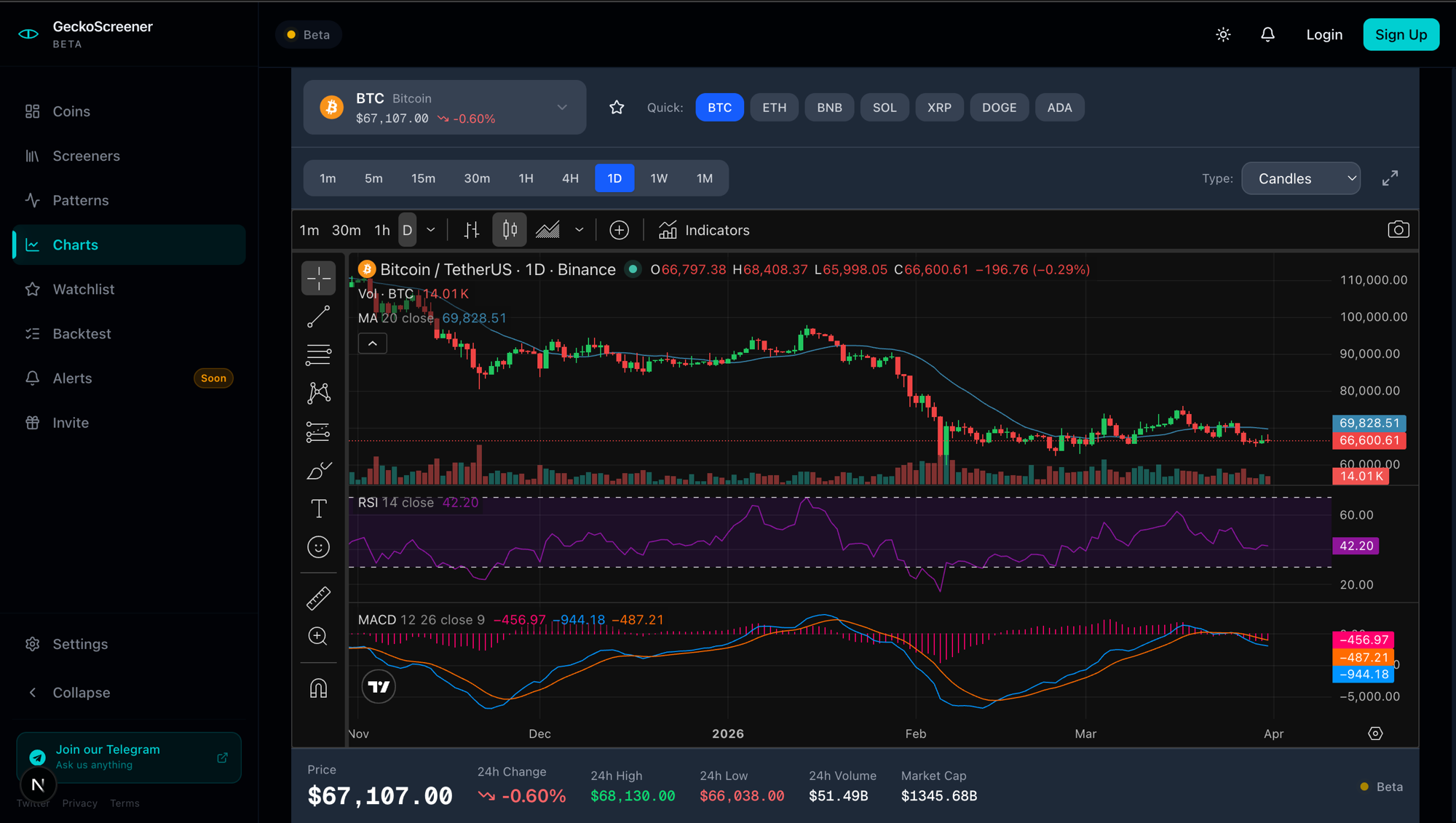
Quick Summary
- GeckoScreener lets you build a multi-condition crypto screener without code, using a visual filter builder with 11+ indicators and 19 candlestick patterns.
- You can scan 100+ cryptocurrencies in real time on the free tier — no account required to get started.
- Backtesting — test your strategy conditions against months of historical data across Top 10/25/50/100 coins — is coming soon.
- Telegram and Discord alerts that fire the moment a coin matches your screener are coming soon.
- The community library lets you browse, copy, and run strategies from the top-performing traders on the platform.
Why GeckoScreener Exists
Most crypto screeners were built for equity traders and retrofitted for crypto. They handle indicators reasonably well but miss the things that actually matter in altcoin markets: candlestick pattern scanning at scale, community-validated strategies, and multi-coin backtesting with realistic position sizing.
GeckoScreener was built crypto-native, from the ground up, for the specific problem of finding early-stage setups in a universe of hundreds of volatile assets.
The result: a free tool that does more — in terms of patterns, backtesting depth, and community features — than most paid screeners in the space.
Let's use it.
Getting Started: Your First Screener in 60 Seconds
You don't need an account to build and run your first scan. Go to geckoScreener.com and open the screener builder.
Step 1 — Open the Screener Builder
The screener builder is the core of GeckoScreener. It's a visual editor where you add conditions to a filter. Each condition specifies: an indicator or pattern, a comparison operator, a threshold value, and a timeframe.
When you click "Run Screener," the engine evaluates every condition against every coin in the universe simultaneously. Coins that pass all conditions appear in your results.
Step 2 — Add Your First Condition
Click "Add Condition." A dropdown lets you choose from:
- Indicators: RSI, MACD, ADX, EMA, SMA, Stochastic, Bollinger Bands, volume-based indicators
- Candlestick patterns: 19 patterns including hammer, bullish/bearish engulfing, morning star, doji, shooting star, three white soldiers, and more
- Price conditions: Price above/below a moving average, price change percentage, distance from high/low
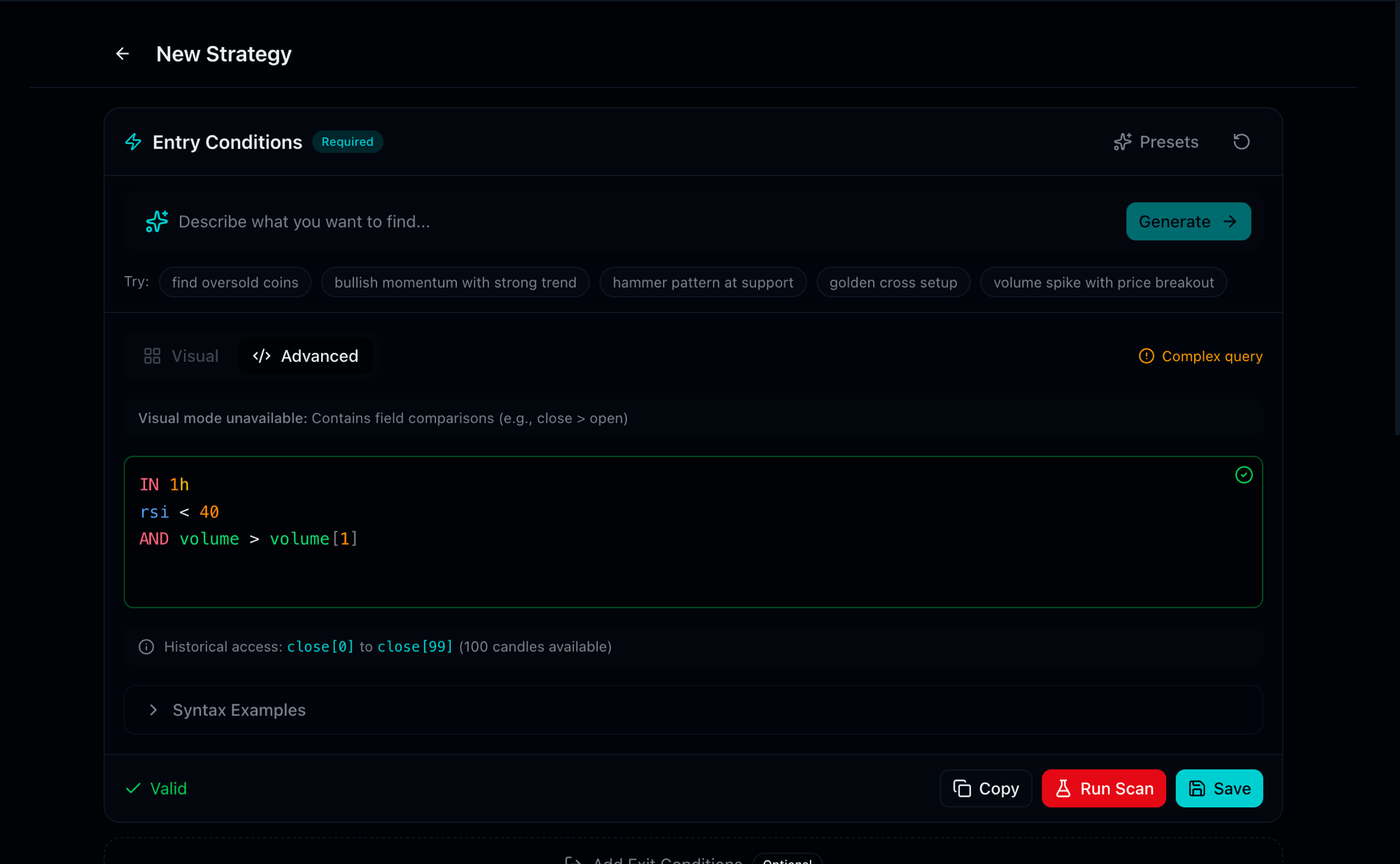
For your first scan, start with something simple and high-signal: RSI below 35 on the 4-hour timeframe.
Select:
- Indicator: RSI (14)
- Timeframe: 4H
- Operator: is below
- Value: 35
This condition will flag coins showing oversold momentum on the 4-hour chart — a classic setup indicator for a potential reversal.
Step 3 — Add a Volume Confirmation
Price signals without volume are noise. Add a second condition:
- Indicator: Volume
- Operator: is above
- Value: 150% of 30-day average
Now your screener requires both conditions to be true simultaneously. A coin qualifies only if it's oversold and showing unusual volume — much stronger signal than either alone.
Step 4 — Run the Scan
Click "Run Screener." In 2–3 seconds, the engine returns a filtered list of coins meeting both conditions. Each result shows the coin name, current price, percentage change, RSI value, and volume ratio.
On an average day, this two-condition filter returns 3–12 coins from a 100+ coin universe. Those are your candidates.
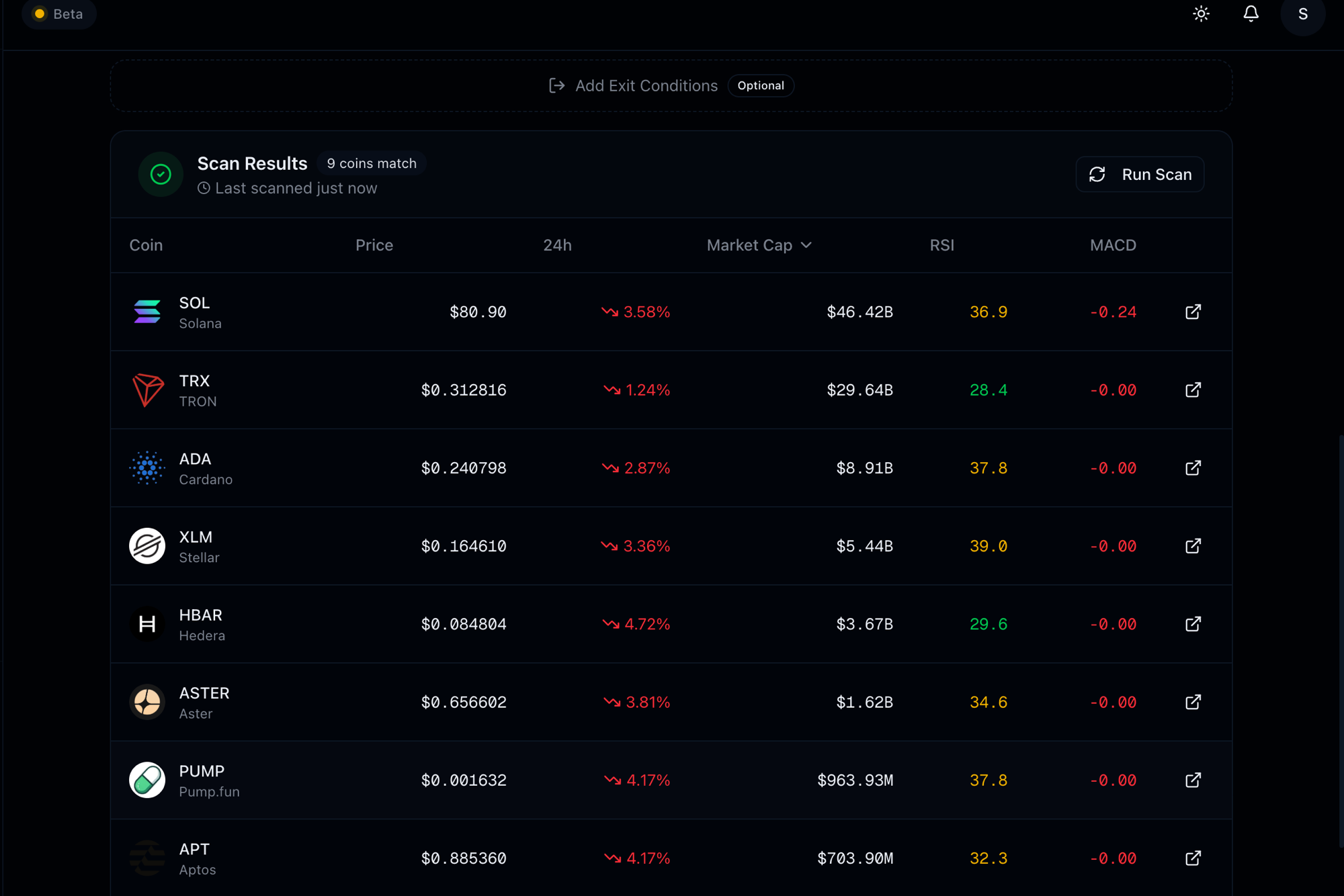
That's it. Sixty seconds, from zero to a live, multi-condition altcoin scan.
Understanding Your Screener Results
Reading the Output
Each row in your screener results represents a coin that passed every condition. The columns show:
- Coin / Pair: The asset name and trading pair (e.g., SOL/USDT)
- Price: Current market price
- Change %: Price change over the selected period (1H, 24H, 7D)
- RSI: The current RSI value for your specified timeframe
- Volume: 24H volume and the ratio to 30-day average
- Signal: The pattern or indicator condition that triggered
Click any row to open the full coin view with chart, all indicator readings, and a link to the trading chart.
What the Results Don't Tell You
A screener result is a candidate — not a trade recommendation. Before acting on any screener output:
- Check the chart: Is the RSI oversold in a downtrend or at a key support level?
- Check the broader market: Is BTC in a consolidation phase that might suppress altcoin moves?
- Check the catalyst: Volume spikes often have a reason — news, listing, or manipulation. Verify which.
- Check the liquidity: Some small-cap coins show screener signals but have spreads that make clean execution difficult.
The screener narrows your universe. Analysis tells you whether to act.
Building a Real Strategy
Choosing Your Indicators
The best screener strategies use 2–4 conditions that cover different dimensions of a setup:
| Dimension | What to Use |
|---|---|
| Momentum | RSI, Stochastic, MACD |
| Trend direction | EMA/SMA crossover, ADX, price above/below EMA |
| Volume confirmation | Volume vs. average, OBV direction |
| Pattern | Candlestick pattern condition |
A strong combination example:
Condition 1: RSI (14, 4H) below 35           ← Momentum: oversold
Condition 2: Price above EMA (20, Daily)      ← Trend: still in uptrend
Condition 3: Volume above 150% of 30D avg    ← Confirmation: real activity
This three-condition filter identifies assets that are short-term oversold but still in a longer-term uptrend, with elevated volume confirming the move — a high-quality reversal setup profile.
Setting AND Conditions
GeckoScreener uses AND logic by default: a coin must satisfy every condition to appear in results. This is intentional. OR logic (where any single condition triggers) tends to produce large, noisy result sets. AND logic keeps your output tight and high-conviction.
As you add conditions, the result count narrows. If you're consistently getting 0 results, your conditions are too tight — either loosen a threshold or remove your least-certain condition. If you're getting 30+ results, add a condition to filter further.
Saving and Naming Your Strategy
Once your filter is built and tested, save it as a named strategy. Saved strategies:
- Can be set up with persistent alerts
- Can be made public to share with the community
- Appear in your strategy dashboard with performance stats
- Can be backtested at any time from the strategies page
Give your strategy a descriptive name that captures its logic — e.g., "4H Oversold + Volume Spike" — so you can recognize it at a glance when reviewing multiple strategies.
Backtesting Your Strategy
🚧 Coming Soon — The backtesting engine is currently in development and will be available soon. The section below describes how it will work so you can plan your testing workflow ahead of launch.
Why Backtest Before You Trade
A new strategy is a hypothesis. Backtesting is how you find out if the hypothesis had merit historically.
Without backtesting, you're trading a theory about what the market does. With backtesting, you have statistical evidence about how your specific conditions performed against real historical price data. That doesn't guarantee future performance — but it eliminates strategies that were never viable.
Running Your First Backtest
Navigate to the Backtest section after saving your strategy. Configure:
Coin Universe: Choose from Top 10, Top 25, Top 50, or Top 100 coins by market cap. Top 25 gives you a good balance — enough diversity to generate meaningful signals, liquid enough that results reflect real tradeable conditions.
Time Period: Choose from 1 week to 9 months of historical data. For a meaningful sample, use at least 3–6 months. Shorter periods may not include enough signal events to draw conclusions.
Capital Mode:
- Per-coin mode: Equal capital allocated to each coin independently
- Portfolio mode: Shared capital pool with position sizing — trades compete for the same capital, which is more realistic
For realistic performance measurement, use Portfolio mode with a capital amount that reflects your actual intended allocation.
Entry and Exit: Configure whether your strategy enters on candle close or signal bar, and whether you're using a fixed take-profit/stop-loss or letting the screener define exits.
Click "Run Backtest." The engine processes every historical bar across your selected coin universe and runs your strategy conditions against each one.
Interpreting Your Results
Equity Curve: The most important output. A smooth upward slope over the period indicates a consistent edge. An equity curve that rises sharply then collapses often indicates the strategy worked in one regime (e.g., bull market) but not another. Be skeptical of curves with a single large winning period.
Win Rate: The percentage of trades that closed profitably. A good screener strategy typically shows 45–65% win rate, with the remaining edge coming from favorable risk/reward on winners vs. losers. Win rates above 75% in backtests often indicate overfitting.
Average Return per Trade: The mean gain or loss per signal. A 55% win rate with a 2:1 average win/loss ratio is a strong edge. A 70% win rate with 1:1 win/loss is mediocre.
Trade Count: Too few trades (under 20) means the sample is too small to draw conclusions. Consider extending the time period or expanding the coin universe.
Maximum Drawdown: The largest peak-to-trough decline during the backtest period. This tells you the worst sustained losing stretch the strategy experienced historically. A strategy with a 40% max drawdown requires substantial psychological tolerance to trade live.
What Good Backtest Results Look Like
| Metric | Weak | Acceptable | Strong |
|---|---|---|---|
| Win rate | < 40% | 45–55% | 55–65% |
| Avg return/trade | < 0.5% | 1–2% | > 2% |
| Win/Loss ratio | < 1:1 | 1.5:1 | 2:1+ |
| Max drawdown | > 35% | 15–25% | < 15% |
| Trade count | < 20 | 20–50 | 50+ |
A strategy meeting "Acceptable" across all metrics is worth trading with real capital on a small allocation. A strategy meeting "Strong" in most metrics with 50+ historical trades has a meaningful statistical foundation.
Setting Up Alerts
🚧 Coming Soon — Alert notifications (Telegram, Discord, webhooks) are currently in development and will be available soon. The section below describes how the alert system will work once launched.
Why Alerts Matter
The screener's value compounds when you're not watching it. Markets don't respect your schedule. A volume breakout on a key level might happen at 3am. An RSI signal might fire during your lunch break. Real-time alerts will ensure you capture signals as they happen, not after the move is over.
Telegram Alerts: Personal Bot Setup
Telegram is the primary alert channel for most crypto traders — it's fast, mobile-first, and already integrated with how most of the crypto community communicates.
To set up personal Telegram alerts:
- Search for @GeckoScreenerBot in Telegram and start the bot
- The bot will give you a unique link code — paste it into GeckoScreener's alert configuration
- Select which strategies should trigger alerts
- Configure your preferred timeframes
Once connected, when any coin in your screener passes all conditions, you receive a Telegram message with: coin name, signal description, current price, timeframe, and a link to the chart.
Free tier: 15-minute delayed alerts via Telegram Pro tier: Real-time alerts, as fast as 60 seconds from signal to notification
Group Bot: Sharing Signals with a Community
GeckoScreener also supports group Telegram bots — you can route screener signals to a group you manage or moderate. This is useful for:
- Running a signals channel for your community
- Sharing alerts with a trading group
- Automating a public channel with your screener's output
The group bot setup follows the same process as the personal bot — invite the bot to your group, connect the group's code in GeckoScreener, and configure which strategies feed to it.
Discord Webhooks
For Discord communities, GeckoScreener supports webhook integration. Generate a webhook URL in your Discord server settings, paste it into GeckoScreener's alert configuration, and screener signals will post directly to your chosen Discord channel.
The Community Strategy Library
Why Community Matters
The community strategy library solves the cold-start problem: when you're new to screening, building validated strategies from scratch is genuinely difficult. You don't know which indicator combinations work in crypto markets, which timeframes are signal-rich vs. noisy, or which patterns have held up historically.
The community library shows you the most-liked and most-used public strategies — built by traders who've already done the iteration. You can apply any strategy to your screener in one click, run it, and see what it surfaces today. You can also copy it as a starting point and modify it.
Browsing the Library
The community library is sorted by:
- Most liked: Community-validated quality. High-like strategies have been reviewed by many traders and found useful.
- Most used: Most-applied by other traders. High-use strategies are actively running and generating signals.
- Newest: Recently published strategies. Useful for finding setups built for current market conditions.
Each strategy shows its indicator conditions, the timeframe it targets, the creator's username and XP rank, and how many traders are currently running it.
Contributing Your Own Strategies
When you publish a strategy publicly:
- It appears in the community library
- Other traders can apply it, like it, and run it
- You earn XP points toward the leaderboard when your strategy is liked or used
- You can see aggregate data on how many traders are running your strategy and getting signals
The leaderboard tracks top contributors by all-time, monthly, and weekly XP — creating a reputation layer that surfaces consistently useful strategy builders.
Advanced Features: TradingView Export and Pattern Scanner
Exporting to TradingView Pine Script
If you do your deep analysis in TradingView, GeckoScreener lets you export your strategy conditions as a Pine Script indicator. The exported script replicates your screener's indicator conditions on TradingView charts, so you can visually verify historical signals on any chart.
This is particularly useful for validating why specific coins appeared in your screener — you can see exactly where the conditions triggered on the price chart.
To export: open any saved strategy → click "Export to TradingView" → copy the generated Pine Script → paste into TradingView's Pine Editor and apply to a chart.
The Pattern Scanner
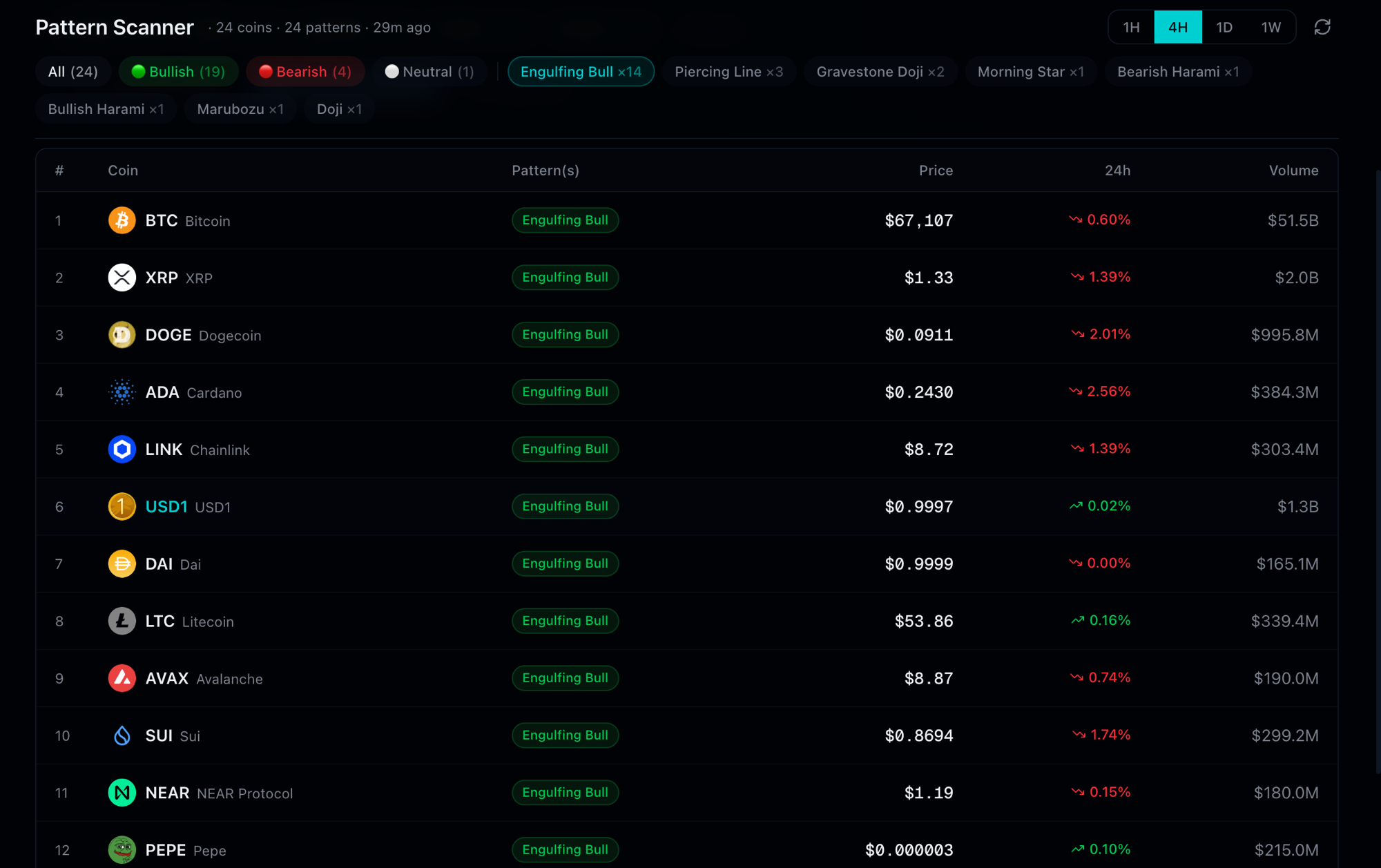
The pattern scanner is a dedicated view showing which coins are currently showing specific candlestick patterns in real time. Unlike the screener builder (which requires you to construct conditions), the pattern scanner is pre-configured for each pattern and runs continuously.
Navigate to the Patterns section to see:
- Which coins are currently showing a hammer, engulfing, doji, morning star, or any of the 19 supported patterns
- The timeframe and confidence level of each pattern
- A shareable signal card with OG preview for Twitter and Telegram sharing
Pattern pages — e.g., /patterns/hammer — are also the deepest educational resources on each specific pattern, covering formation conditions, historical accuracy rates, and how to combine each pattern with indicators in the screener.
Common GeckoScreener Mistakes
Running the Screener Once and Forgetting It
A screener is not a signal fire-and-forget. Markets move in regimes — a strategy that worked well in a trending bull market may underperform during consolidation. Check your live strategies weekly. If a strategy hasn't fired in 2+ weeks, check whether market conditions have changed in a way that makes your conditions temporarily rare.
Using Only One Timeframe
Every indicator and pattern looks different on different timeframes. A daily hammer candle is a meaningful structure signal. A 1-minute hammer is noise. Use multi-timeframe logic: screen on 4H for the setup, confirm on the daily for trend context.
Copying Community Strategies Without Understanding Them
The community library is a starting point — not a turn-key trading system. Before running any community strategy with real alerts, read through its conditions and understand what each one is looking for. If you can't explain the logic of the strategy in plain language, you won't recognize when market conditions make it less valid.
Ignoring the Disclaimer on YMYL Content
Screener signals are technical indicators. They are not financial advice. Every real-money trade requires your own analysis, risk management, and position sizing. No screener, backtest, or community strategy changes this.
Frequently Asked Questions
Is GeckoScreener free? Yes. The core screener builder, visual strategy editor, 19 candlestick patterns, 11+ indicators, community library, and backtesting (3 runs/day, Top 10 coins, 3-month period) are all free. Pro ($19/month) unlocks real-time alerts, unlimited backtesting, full historical range, Top 100 coin universe, and portfolio backtesting mode.
How many conditions can I add to a screener? Free tier supports up to 10 conditions per strategy. Pro supports unlimited conditions. In practice, most effective strategies use 3–5 conditions. More than 6–8 conditions typically results in over-filtering and near-zero results.
Can GeckoScreener scan DEX tokens or only Binance pairs? Currently, GeckoScreener scans CoinGecko and Binance-listed pairs — primarily major and mid-cap centralized exchange assets. DEX and small-cap token scanning is on the product roadmap.
How is GeckoScreener different from TradingView's screener? TradingView's screener focuses on chart indicators and is powerful for equities. GeckoScreener is crypto-native: it includes 19 candlestick patterns (more than TradingView's crypto coverage), multi-coin portfolio backtesting, community strategy sharing with XP and leaderboards, and Telegram/Discord alert routing optimized for how crypto traders actually work.
What is portfolio backtesting mode? Portfolio mode simulates your strategy as if all signals from all coins were drawing from a single shared capital pool, with position sizing applied. This is more realistic than per-coin mode, which treats each coin as a separate strategy with infinite capital. Portfolio mode shows you how the strategy would have performed as an actual trading portfolio, including scenarios where multiple coins signal simultaneously.
Can I share my screener results publicly? Yes. Public strategies appear in the community library. Individual pattern scanner results can be shared as signal cards with a shareable URL and OG preview image — optimized for Twitter, Telegram, and Farcaster.
Your Next Steps
You now have everything you need to build, test, and automate a systematic crypto screening workflow.
Start here: Open the screener builder and replicate the RSI + volume setup from Step 2–3 above. Run it. Look at what surfaces. Then spend 10 minutes with the community library to see how top-ranked strategies are constructed differently.
Once you have a strategy you believe in: backtest it, set up a Telegram alert, and let GeckoScreener do the monitoring while you focus on analysis and execution.
Related reading:
- What Is a Crypto Screener? — The fundamentals behind how screeners work
- Backtest a Crypto Trading Strategy — A no-code guide to testing rules before you trade them
This content is for educational purposes only and does not constitute financial advice. Cryptocurrency trading involves significant risk of loss. Past backtest performance does not guarantee future results. Always conduct your own research before making trading decisions.
GeckoScreener Team
Written for the GeckoScreener community. Join us on Telegram →
Start screening cryptocurrencies for free
Apply strategies like this one in real-time across 250+ coins.
Try GeckoScreener →