7 Best Platform to Backtest Trading Strategies in 2026
Compare the best platform to backtest trading strategies by assets, speed, usability, pricing, features, pros, cons, and ideal users.
GeckoScreener Team
Aug 23, 2026 · 17 min read
Updated about 2 months ago

The most popular advice about the best platform to backtest trading strategies is usually wrong because it treats backtesting as a feature race. A fast chart tester isn't automatically the right choice for portfolio research, and a powerful coding engine can be a poor fit for a trader who wants to validate a crypto setup without writing software. The better question is: what job must the platform perform in your workflow?
This comparison evaluates seven tools by asset coverage, testing speed, coding requirements, validation depth, usability, pricing transparency, and the path from research to execution. GeckoScreener deserves a careful distinction. Its live trading and backtesting features aren't available yet, while backtesting and alerts are expected soon. Its existing screening and strategy-building workflow is still relevant context for traders deciding what they want from an upcoming validation tool, not a claim that those trading features are currently live.
The chart images below are practical reference points. Look for how each product presents rules, equity curves, trade histories, and visual test results. A clean chart is useful, but the serious question is whether the platform shows enough information to challenge the strategy rather than merely flatter it.
Table of Contents
- 1. GeckoScreener
- 2. TradingView Strategy Tester
- 3. TrendSpider
- 4. QuantConnect
- 5. MetaTrader 5
- 6. AmiBroker
- 7. 3Commas
- Top 7 Backtesting Platforms Comparison
- Choose the Platform That Matches Your Test
1. GeckoScreener
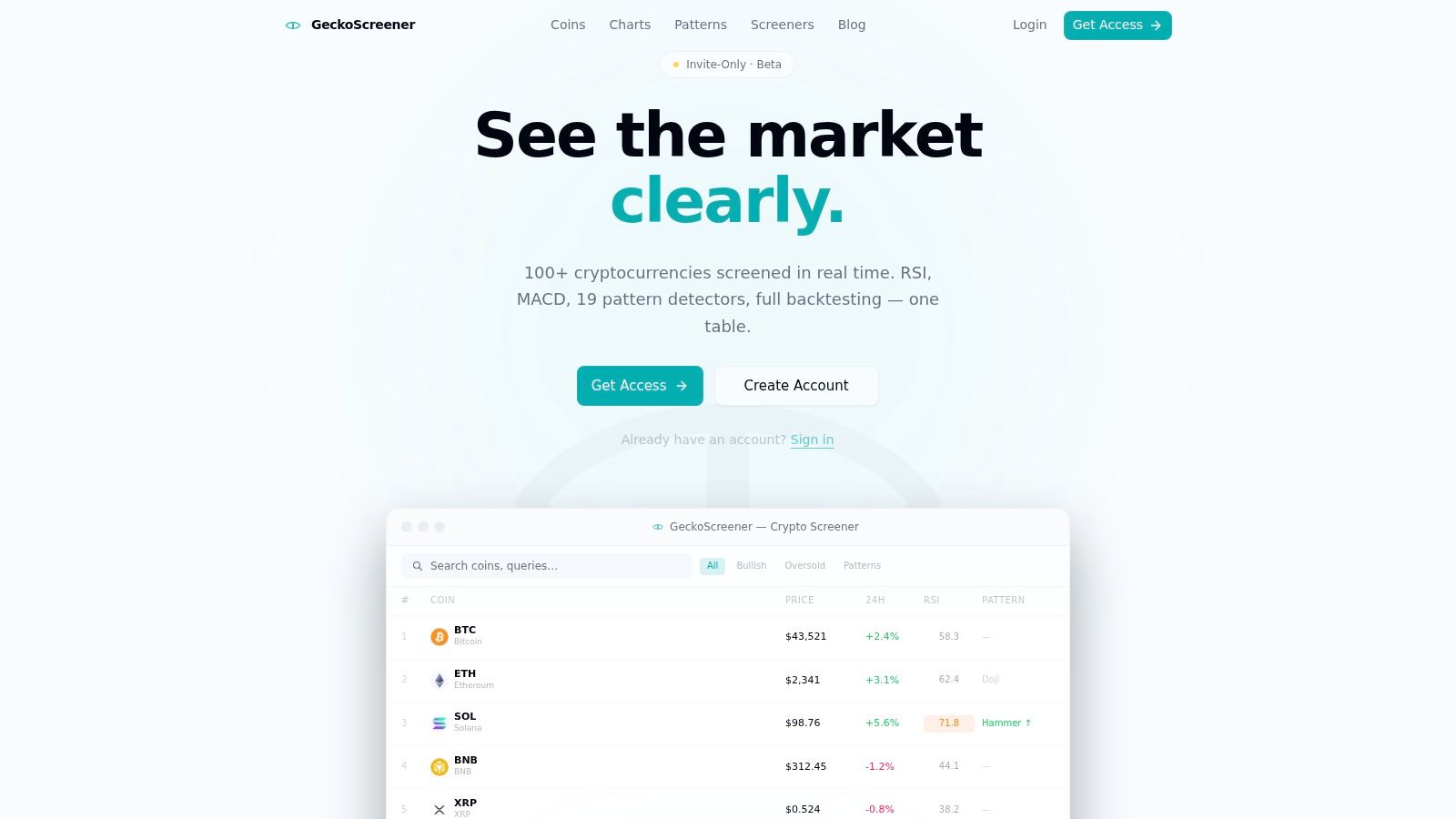
GeckoScreener is aimed at traders who need no-code crypto screening and strategy validation in one workflow. Its current product focuses on filtering cryptocurrencies, combining technical conditions, and turning plain-language ideas into strategy queries. The boundary is important: live trading and backtesting features are not available yet. Backtesting and alerts are expected soon, so its planned testing workflow should not be treated as current execution functionality.
The existing screener supports conditions based on RSI, MACD, ADX, EMA, volume, price action, and candlestick patterns such as Doji and Hammer. That makes it useful for narrowing a crypto watchlist before testing an idea elsewhere. Its natural-language strategy builder addresses a different task, translating rules into a runnable query without requiring code or query syntax.
Best workflow and trade-offs
The intended workflow runs from screening to strategy construction to validation. If the planned backtesting tools become available, retail swing and day traders could keep those stages in one crypto-focused interface instead of moving between separate products. The described feature set includes configurable entry and exit rules, stop-loss and take-profit parameters, portfolio-mode and per-coin evaluation, equity curves, and complete trade histories.
Those outputs support a more useful review than a single return figure. Traders can examine simulated trades and the equity curve, then check how the rules behaved across individual assets. A practical testing process should also inspect the trade history and review results bar by bar, as explained in this guide to backtesting a trading strategy.
The main trade-off is timing and scope. The platform's trading and backtesting functions are still forthcoming, while its public materials promote a free strategy builder and sign-up flow without listing detailed paid-plan pricing. Its planned historical coverage also appears better suited to recent crypto validation than to research across long market cycles or multiple asset classes.
Practical rule: Use GeckoScreener today for crypto screening and strategy construction. Treat trading, backtesting, and alerts as upcoming capabilities until the product confirms they are enabled.
This crypto strategy backtesting guide describes the type of crypto testing workflow the platform is being built to support. Check current availability before relying on any planned feature.
Pros
- Low-friction idea translation: Plain-language strategy creation suits traders who do not want to learn a query language.
- Consolidated research: Screening and strategy design sit within one crypto-focused workflow.
- Technical signal coverage: Indicator and candlestick conditions can be combined in a single setup.
- Community reproducibility: Saved and shared strategies can support comparison and discussion.
Cons
- Features aren't live yet: Confirm trading, backtesting, and alerts before depending on them.
- Public pricing is limited: Detailed paid-plan information is not listed.
- Crypto focus: The platform is not designed for broad multi-asset portfolio research.
2. TradingView Strategy Tester
TradingView suits traders who start with a chart and want to finish with an alert. Its Strategy Tester runs Pine Script strategies on charts covering crypto, foreign exchange, futures, equities, and other instruments available through the platform. The workflow turns a visual hypothesis into explicit rules without requiring a separate research application.
Its strongest use case is chart-based discovery. Traders can inspect community scripts, adapt existing logic, and compare behavior across symbols from the same interface. Reports include performance results, an equity curve, and a trade list, so users can examine outcomes beyond a signal overlay.
TradingView also links historical testing with alerts. After testing a Pine Script strategy, traders can review its past behavior and use strategy alerts for manual execution or an external automation setup. This makes the platform practical for moving from research to monitoring, although the connection does not replace execution modeling.
The trade-off appears in research depth. Advanced users may find optimization and portfolio analysis less flexible than in code-first platforms. Deep Backtesting is tied to the Premium tier, so traders requiring broader historical coverage should check plan capabilities before committing.
A disciplined test should compare results with a benchmark and review Sharpe ratio, maximum drawdown, win rate, profit factor, and days in market. MathWorks' backtesting documentation outlines this benchmark-oriented approach.
Best for: Chart-focused traders who want community scripts, broad market access, and a direct path from analysis to alerts.
Trade-off: TradingView works well for single-chart strategy development. Portfolio modeling, extensive optimization, and detailed execution simulation may require a specialized engine.
3. TrendSpider
TrendSpider targets traders who formulate rules visually. Its no-code Strategy Tester lets users specify conditions through an interface and test technical ideas across stocks, futures, foreign exchange, and crypto. The workflow suits traders who want more structure than discretionary chart review without writing Pine Script, Python, or another programming language.
Its strongest function is batch validation. Multi-symbol and variance tests let traders compare the same rule across markets, timeframes, and testing horizons without rebuilding it for every chart. The result is a broader question: does the rule behave consistently across the environments the trader may use, or did it succeed only on one familiar symbol?
Where visual forensics help
TrendSpider's trade-by-trade Price Behavior Explorer adds diagnosis to the summary report. Traders can inspect how entries and exits developed around individual price movements, which can expose late entries, fragile stop placement, or results concentrated in a narrow market condition. That review is more informative than judging a strategy from its equity curve alone.
The platform also supports forward-testing and includes controls for slippage and trading costs. These settings let users test less favorable execution assumptions, although they do not determine whether those assumptions match actual market conditions. Historical decisions must use information available at the time, preserve chronological order, and avoid future data entering the signal logic.
TrendSpider's visual workflow also defines its limits. Complex portfolio rules, custom event handling, and detailed execution models may require Python, C#, or a specialized scripting language instead. Plan and add-on restrictions can influence testing depth and access to extra features, so traders should confirm the relevant tier before relying on the platform for extended research.
For chart examples, TrendSpider's interface is most useful when the goal is to connect a rule, its historical trades, and the price behavior surrounding each decision.
Best for: Technical traders seeking fast, visual, no-code testing across multiple symbols and timeframes.
Trade-off: TrendSpider provides broader visual testing than a basic chart tester, but less programming control than QuantConnect, MetaTrader 5, or AmiBroker.
4. QuantConnect
QuantConnect suits traders who need to express a strategy as software rather than assemble rules in a chart interface. Built on the open-source LEAN engine, it supports research and backtesting in Python and C#, through cloud or local workflows. Its datasets cover crypto, equities, futures, and foreign exchange, allowing systematic traders to test multi-asset portfolios within one research environment.
The workflow is event-driven. Order timing, portfolio state, fees, slippage, and execution assumptions can therefore be represented directly in the strategy logic. Research notebooks and modeling tools provide more control than no-code platforms, although that control requires programming knowledge and careful configuration.
From research to execution
QuantConnect can carry the same LEAN-based approach from backtesting into paper trading and live connections with brokerages and exchanges. Crypto researchers can use integrations such as Binance and Kraken through LEAN brokerages. Portfolio researchers can also evaluate interactions among positions instead of testing isolated chart signals.
Continuity across these stages is useful, but it does not make a simulation realistic by itself. Data quality, survivorship bias, bar construction, corporate actions, liquidity, and fill assumptions still need review. A well-designed engine can produce a misleading result when the dataset or execution model is poorly specified.
A professional engine improves the simulation. It does not replace disciplined validation.
QuantConnect is a poor fit for traders who want to describe “buy after an RSI reversal” in ordinary language and receive a result without learning a coding workflow. Compute, data, and resource settings can also make total cost less predictable than a basic charting subscription.
Use a backtesting strategies workflow to define data, rules, costs, and validation steps before configuring the engine.
Best for: Developers and systematic traders building multi-asset, event-driven strategies with a route toward live deployment.
Trade-off: It provides the deepest control in this comparison, while demanding the most programming skill and resource planning.
5. MetaTrader 5
MetaTrader 5 suits traders who build coded Expert Advisors and already work with a MetaTrader broker. Its Strategy Tester supports several testing modes, genetic-algorithm optimization, visual inspection, and forward testing. The platform is most practical for foreign exchange and CFD traders whose broker provides the instruments and historical data they need.
MT5 lets users choose testing depth according to the question being examined. Tick-oriented modes can support closer execution analysis, while one-minute OHLC data or open-price testing can speed up initial exploration. Visual testing adds a useful check because traders can observe an EA on the chart instead of relying only on summary statistics.
Why optimization isn't enough
Optimization can search parameter combinations and display results through two-dimensional and three-dimensional visualizations. Forward testing then checks whether an apparently strong configuration survives data outside the optimization sample. The MQL5 Cloud Network can distribute computation when broader optimization requires more processing.
The main limitation is dependence on the broker's data and execution environment. Historical coverage, spreads, and other conditions can vary, so the same EA may produce different results across brokers. MT5 also centers on Expert Advisors and MQL5 development. Traders seeking a no-code workflow will find it less suitable than TrendSpider or the planned GeckoScreener experience. GeckoScreener's trading and backtesting features are not live yet, but are expected soon.
A useful backtesting output guide recommends reviewing an equity curve, trade-by-trade records, and risk measures such as maximum drawdown and Sharpe ratio. Daily profit and loss, trades per day, and buying-power requirements can add further context when assessing whether an EA's results match the intended trading setup.
Best for: Traders using MetaTrader brokers who want coded EA testing, parameter optimization, visual reports, and forward validation.
Trade-off: MT5 offers substantial control within its broker ecosystem, but its workflow is harder for no-code users and its results are less portable across data environments.
6. AmiBroker
AmiBroker is built for fast desktop portfolio analysis, not a guided browser workflow. Its AFL scripting environment lets systematic traders define position sizing, ranking, rebalancing, portfolio constraints, and optimization rules, then test them across many instruments and rule combinations.
Portfolio-level research is its main distinction. Instead of judging each symbol as an isolated chart, users can model how a strategy selects positions within a broader universe. Walk-forward analysis and Monte Carlo testing provide further checks on whether performance depends on one favorable historical configuration or remains credible under varied assumptions.
The cost of control
AmiBroker uses a one-time perpetual-license model, which suits traders who prefer desktop ownership over recurring access fees. The license does not remove the need for market data. Users must choose, connect, and maintain a separate data feed, making data preparation part of the workflow for both end-of-day and intraday research.
The Windows-only setup and AFL requirement narrow its audience. AFL is designed for technical analysis and gives experienced users precise control, but it still requires scripting. Traders who prefer menus or plain-English rule building may find the initial setup demanding. The interface prioritizes research capacity over simplicity.
AmiBroker fits a specific job: testing portfolio rules quickly on a local machine. It is less suitable for a beginner checking one candlestick pattern on one crypto chart, and more suitable for a methodical system developer who needs repeatable ranking, allocation, and risk rules. Its results also depend on the quality and consistency of the connected data.
Best for: Systematic traders conducting portfolio, ranking, walk-forward, and Monte Carlo research on a Windows desktop.
Trade-off: AmiBroker provides strong analytical control, but users must accept AFL scripting, local setup, and separate data-feed configuration. It is a research tool rather than a no-code crypto validation or chart-based testing platform.
7. 3Commas
3Commas is designed for crypto bot configuration and automation, with testing for DCA, Grid, and signal-driven bots across connected exchanges. Its workflow begins with a bot template, then examines entries, safety orders, position sizing, and exits before deployment. This makes it distinct from a chart-only tester, where the main output is a historical strategy result rather than an exchange-ready configuration.
A trader can test configurations against exchange data and pairs, connect webhook inputs such as TradingView signals, and manage the resulting bot in the same crypto-focused environment. That reduces the need to rebuild a DCA or Grid process in Python. The platform therefore suits users whose main task is checking whether a defined automation setup behaved acceptably under historical conditions.
Where it fits, and where it doesn't
3Commas works best when the strategy maps naturally to a bot template. Exchange connections and automation features place testing close to deployment, but historical results still require scrutiny. Fees, slippage, liquidity, funding conditions where relevant, and performance across different market regimes can materially change the outcome.
Template-based logic also limits flexibility. DCA and Grid bots cover common crypto workflows, while a coded event-driven engine can represent broader entry, exit, portfolio, and execution rules. Testing depth, usage limits, and available features vary by plan, so users should confirm current account requirements before choosing it.
A candlestick signal should not stand alone as a trading rule. Confirmation through trend direction, RSI, volume, and support or resistance is recommended in this candlestick patterns guide for crypto traders. That matters particularly for bot testing, because an automated configuration can repeat a weak signal across multiple entries.
Best for: Crypto traders testing and configuring no-code Grid, DCA, or signal bots before connecting them to exchange automation.
Trade-off: 3Commas links configuration testing with bot management, but its template-driven workflow offers less freedom than a full coding framework and is narrower than portfolio research platforms.
Top 7 Backtesting Platforms Comparison
| Item | Implementation 🔄 | Resources ⚡ | Expected outcomes 📊 | Ideal use cases 💡 | Key advantages ⭐ |
|---|---|---|---|---|---|
| GeckoScreener | No-code, plain‑language builder; minimal setup | Web app; low compute; free tier available; 100+ coins, 60s refresh | Rapid idea→validated strategy workflow; backtests up to 9 months with equity curves | Retail/swing/day traders validating indicator & candlestick strategies without coding | Integrated screener → builder → backtest; natural‑language queries; community strategy sharing |
| TradingView, Strategy Tester | Low–medium; Pine Script for custom strategies | Web platform; free & paid tiers; Premium unlocks full symbol history | Chart-linked backtests, equity curve, trade list, alerts; community scripts | Traders who want seamless chart→backtest→alerts across markets | Massive script library; multi-market support; tight chart-to-alert workflow |
| TrendSpider, Strategy Development & Backtesting | Low; visual/no-code rule designer | Web subscription; tiered features (some plan limits) | Multi-symbol and variance tests; trade-by-trade price behavior inspection | Discretionary-to-systematic traders testing technical ideas across timeframes | Batch testing and visual forensics; fast no-code iteration |
| QuantConnect, LEAN | High; code-first (Python/C#) research and algos | Cloud or local compute; datasets and modular pricing; brokerage integrations | Institutional-grade portfolio backtests, detailed execution modeling, paper-to-live continuity | Quant developers and institutional systematic researchers building production algos | Open-source LEAN; strong broker/data integrations; advanced execution and risk modeling |
| MetaTrader 5, Strategy Tester (EAs) | Medium; MQL5 coding for EAs or use marketplace EAs | Desktop client; broker-dependent data; access to MQL5 Cloud for distributed compute | Robust EA optimization (genetic algos), visual testing, forward testing | Retail/prop traders developing coded EAs and running large optimization sweeps | Mature ecosystem, powerful built-in optimizers, wide indicator/EA marketplace |
| AmiBroker, Portfolio Backtesting & Optimization | Medium–high; AFL scripting and desktop setup | Windows desktop; external data feeds; one-time license; high-performance local compute | Very fast portfolio backtests, walk-forward and Monte Carlo risk analysis | Systematic developers needing fast, rigorous portfolio analytics on large universes | High-speed backtesting; rigorous portfolio analytics; perpetual license |
| 3Commas, Crypto Bot Backtesting | Low; no-code bot templates (Grid/DCA/Signal) | Web app; exchange API access; subscription tiers affect depth/features | Backtests bot configs on real exchange historical data; ready-to-deploy bot settings | Crypto traders validating and running automated bots without coding | Broad exchange/pair coverage; webhook/TradingView integrations; combined backtest + live bot management |
Choose the Platform That Matches Your Test
The best platform isn't the one with the longest feature list. It's the one that matches the decisions you need to make before risking capital.
Choose GeckoScreener if your intended workflow is no-code crypto screening, technical signal construction, and upcoming validation in one place. Its current screening and strategy-building context is relevant, but trading, backtesting, and alerts aren't live yet. Treat those capabilities as expected soon, and confirm availability directly before using the platform as part of a production workflow.
Choose TradingView when your research starts on a chart and needs to move quickly into alerts. Choose TrendSpider when you want to iterate visually across symbols, timeframes, and rule variations without writing code. These tools suit traders who value speed and usability over customized portfolio or execution modeling.
Choose QuantConnect when you write Python or C# and need multi-asset, portfolio-level, event-driven research. Choose MetaTrader 5 when you develop Expert Advisors inside a broker-connected MetaTrader environment and want optimization, visual testing, and forward testing. Choose AmiBroker when fast desktop processing, portfolio rules, and advanced system analysis matter more than a beginner-friendly interface.
Choose 3Commas when the thing you need to validate is a crypto bot configuration, especially a Grid, DCA, or signal-driven workflow. It isn't a substitute for a general-purpose research engine, but it can be more relevant than one when your next step is exchange-connected bot automation.
Whatever platform you select, use the same validation discipline:
- Define the asset universe: State which symbols, markets, and instruments the strategy is allowed to trade.
- Write exact rules: Specify entries, exits, stop-loss conditions, take-profit conditions, position sizing, and timing.
- Model trading friction: Include fees and slippage wherever the platform supports those assumptions.
- Inspect the full record: Review the equity curve, trade history, drawdown behavior, and individual entries rather than relying on a single return figure.
- Test beyond one chart: Compare symbols, periods, and market conditions to find out whether the result depends on one favorable sample.
- Respect chronology: Run the simulation bar by bar using only information available at that moment.
- Treat history as evidence, not proof: A strong backtest can support further research, but it can't guarantee future performance.
The market for backtesting software is expanding, with one forecast placing the category at USD 405.06 million in 2024, USD 444.16 million in 2025, and USD 833.83 million by 2032, at a projected 9.44% CAGR. That trajectory reinforces a practical point: platform selection is becoming a software decision, not merely a personal trading preference. The best choice still depends on whether you need a screener, chart tester, bot configurator, portfolio lab, or coded execution engine.
GeckoScreener brings crypto screening, technical indicators, candlestick detection, and plain-language strategy building into one workflow, while its trading, backtesting, and alert features are expected soon. Visit GeckoScreener to explore the current platform and follow the upcoming tools that can connect crypto discovery with more structured validation.
GeckoScreener Team
Written for the GeckoScreener community. Join us on Telegram →
Related Articles

Start screening cryptocurrencies for free
Apply strategies like this one in real-time across 250+ coins.
Try GeckoScreener →