10 Crypto Trading Tools for Smarter Decisions in 2026
Compare 10 crypto trading tools for screening, charting, bots, backtesting, and portfolio research, with practical picks by trader type.
GeckoScreener Team
Aug 26, 2026 · 21 min read
Updated about 2 months ago
You open one chart to check trend, another dashboard to inspect exchange flows, then a screener, an alert panel, and perhaps a bot interface before deciding whether a single setup deserves attention. By the time you've compared indicators across venues, translated the idea into rules, and checked whether the trade could have survived historical conditions, the market may have moved, while the risks remain easy to miss.
The best crypto trading tools aren't necessarily the platforms with the longest feature lists. They're the tools that remove a specific bottleneck without concealing data gaps, execution risk, or validation limits. This list groups ten options by the problems they solve, from finding setups and reading charts to automating execution, validating strategies, and adding broader market context.
The examples and chart images show where each resource fits in a practical workflow. GeckoScreener currently provides screening and strategy research capabilities, while trading and backtesting features are not yet available in the product context described here. Alerts and backtesting are expected soon, so verify current availability before relying on those features.
Table of Contents
- 1. GeckoScreener
- 2. TradingView
- 3. TrendSpider
- 4. 3Commas
- 5. Cryptohopper
- 6. Bitsgap
- 7. Altrady
- 8. Glassnode Studio
- 9. Santiment Sanbase
- 10. CryptoQuant
- Top 10 Crypto Trading Tools: Feature Comparison
- Choose the Smallest Stack That Solves the Problem
1. GeckoScreener
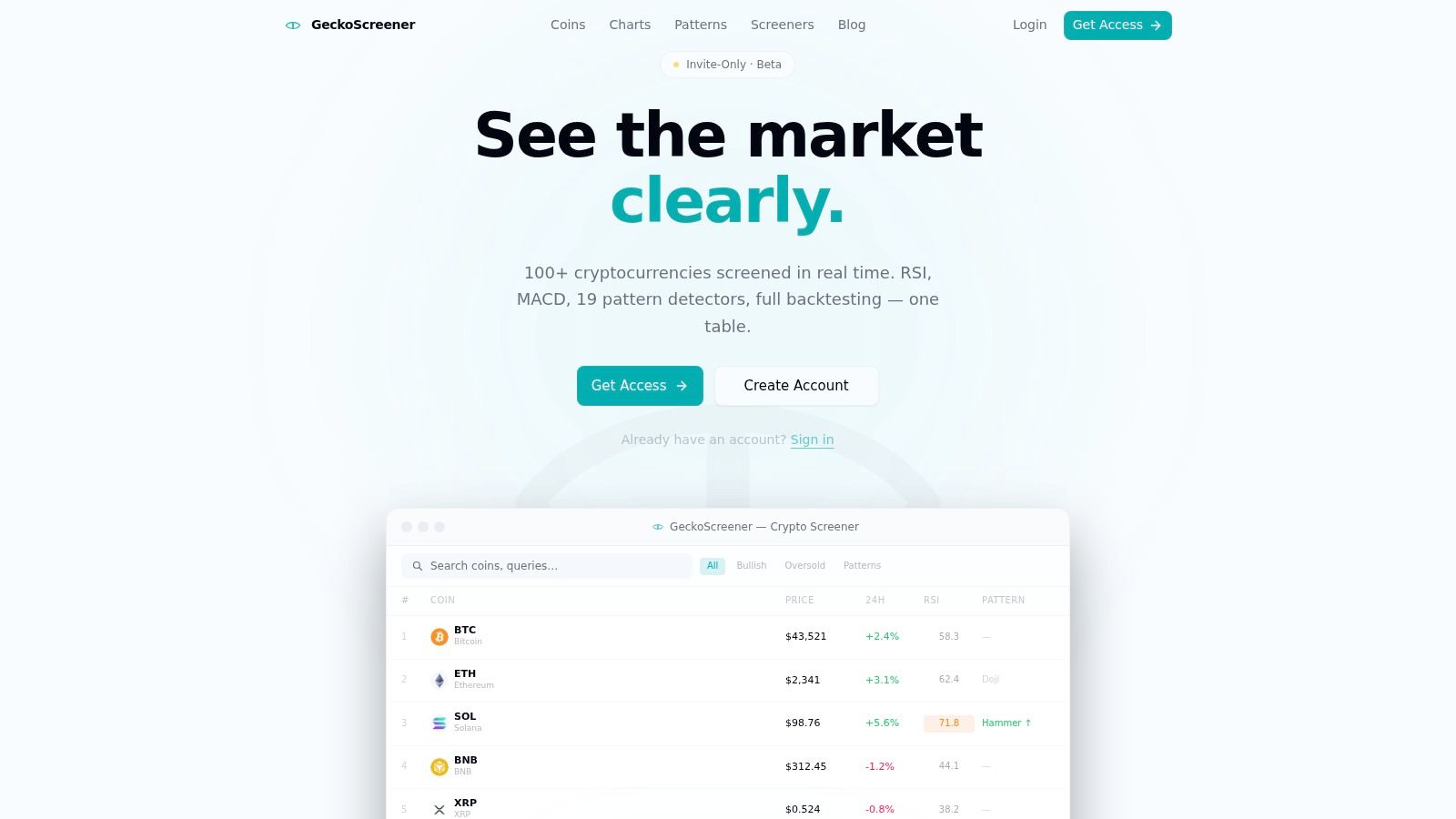
A trader screening several coins for the same setup can lose time rebuilding conditions across charts and tools. GeckoScreener addresses that bottleneck by combining market screening, no-code strategy construction, and historical validation in one interface. It fits the discovery and early testing stages of a workflow, rather than live execution.
Its real-time screener covers 100+ coins and refreshes every 60 seconds, according to the product information provided. A sortable table combines RSI, MACD, ADX, EMA, volume, and price-action conditions with 19 candlestick pattern detectors, including Doji and Hammer. Traders can therefore filter for a defined confluence before reviewing individual charts, although indicator matches still require context such as liquidity and timeframe.
From an idea to a testable rule
The plain-language strategy builder is the platform's clearest workflow advantage. A trader can enter a condition such as RSI < 35 AND close crossed_above ema(20) AND hammer = true, then produce a runnable query without learning query syntax or writing code. Entry and exit conditions can include stop loss and take profit settings, preserving the intended trade structure during testing.
Saved and shared strategies support repeatable research. Community publishing also makes a rule set easier to reproduce and discuss, but the public pages reviewed do not show formal customer testimonials, awards, or third-party certifications.
Practical rule: Treat a readable rule set as a starting point for investigation, not as proof that the strategy has an edge.
Where it fits, and where it doesn't
GeckoScreener's backtesting workflow can test strategies for up to nine months across the top 100 coins, using either per-coin or portfolio mode. Equity curves and detailed trade logs provide more useful evidence than a single headline return because traders can inspect performance across assets and individual trades.
That scope also defines the limitation. The available coverage and historical depth may not suit research on a wider altcoin universe or longer market cycles. The public product information does not show explicit paid-tier pricing or live order execution. The site promotes a free strategy-builder trial and a “Get Started Free” prompt, while also referencing an invite-only beta community. Confirm current access, feature availability, and plans at GeckoScreener.
2. TradingView
A screened setup can look attractive until price structure, timeframe context, or liquidity changes the interpretation. TradingView gives traders a place to test that context before acting. Its crypto coverage includes coin, CEX-pair, and DEX-pair screeners, while its indicator library and community scripts support standard technical analysis and custom workflows.
Pine Script lets users build indicators and strategies, and the integrated Strategy Tester supports historical simulation and forward testing. These features make TradingView useful for checking whether a rule behaves consistently. They do not remove the need to understand the script, inspect its assumptions, and verify how signals appear on the chart.
Best use in a decision process
A practical workflow starts with market discovery, then moves to chart review. Use a screener to narrow candidates, compare structure across timeframes, and set an alert for a defined condition. Alerts reduce the need for continuous monitoring, but they work only as well as the rule behind them.
A signal still needs visual verification when it depends on candle structure, liquidity, or a venue-specific price series. Indicator and alert limits vary by plan and region, and screener behavior can differ across asset classes. TradingView therefore fits the interpretation and monitoring stage more clearly than the portfolio research stage.
A crowded chart can make review harder. A focused combination of price structure, a small number of conditions, and a documented risk rule is easier to test and audit. Traders refining a technical-analysis process can compare their assumptions with the best indicators for crypto trading.
Choose TradingView when chart interpretation, alerts, or custom scripting is the bottleneck. Pair it with a screener for setup discovery, while using a separate research system when portfolio-level analysis is the main requirement.
3. TrendSpider
A trader comparing dozens of crypto charts can spend more time checking conditions than evaluating trades. TrendSpider addresses that bottleneck with automated scanning, pattern and level detection, multi-timeframe analysis, conditional alerts, and strategy testing for stocks and crypto.
Its Raindrop Charts offer another way to examine price and volume. Volume-weighted candles built around half-bar VWAPs show how traded volume was distributed within a visual price interval. The view can help compare areas where price was accepted or rejected, though it remains an analytical lens rather than a standalone signal.

Automation without full execution dependence
Automated trendlines and pattern detection shorten the route from market-wide discovery to a shortlist of charts. Multi-timeframe analysis helps separate a higher-timeframe trend filter from a lower-timeframe entry condition, which is useful when the trading rule depends on both context and trigger.
Conditional alerts and trading connections through a widget for brokers and exchanges place TrendSpider between analysis and execution. It can automate observation and notification while leaving the trader to decide whether a detected condition justifies an order.
The limitation is interpretation risk. Raindrop Charts require practice before their output becomes intuitive, and data-feed costs can affect pricing or plan inclusions. Traders should compare automated detections with their own chart review and test strategy results across different market conditions.
TrendSpider fits technical traders whose main problem is repeated scanning across many charts and timeframes. Pair it with a separate execution tool when analysis is the bottleneck, rather than treating its detection features as a substitute for a defined trading rule.
4. 3Commas
3Commas focuses on execution management across multiple exchanges. Its cloud-based toolkit includes SmartTrade for manual orders, DCA and Grid bots, signal-driven automation, paper trading, and a marketplace for templates and signals.
SmartTrade supports take-profit, stop-loss, trailing controls, and OCO-style order variants. These functions help traders express a defined plan consistently, especially when positions span several exchanges. The platform manages order logic, but it does not determine whether the underlying setup has an edge.
Useful when the rules already exist
DCA and Grid bots offer presets and historical testing, while paper trading lets users test configurations without immediately committing capital. The marketplace can shorten setup with ready-made bot configurations and signals. It also creates a verification problem: traders still need to understand the entry conditions, position sizing, and exit behavior before relying on someone else's template.
A bot can execute a weak rule more consistently, but it can't make the rule strong.
API and developer-platform options support custom workflows, and a multi-exchange interface can reduce the need to manage separate dashboards. Feature and tier limits may become relevant as the number of bots, accounts, or required functions grows. Results also depend on market regime and tuning. A configuration suited to range-bound conditions may perform poorly during a strong trend or a volatility shift.
Define the strategy outside the bot interface first. Specify the market condition it expects, what invalidates the setup, and how fees, slippage, outages, and API permissions affect execution. Guidance on crypto backtesting tools can support this process, because historical testing should precede unattended deployment.
Explore 3Commas when multi-exchange order management is the immediate problem and regular supervision is part of the workflow.
5. Cryptohopper
Cryptohopper addresses two separate trading problems: building automated rules and adopting existing ones. DIY traders can use its Strategy Designer, backtesting, paper trading, trailing orders, DCA, shorting, and TradingView alert integration. Users who prefer less manual configuration can examine copy-trading and copy-bot subscription options.
The Strategy Designer places rule definition before execution. Traders can formalize entry and exit conditions, then use practice modes to inspect the workflow without immediately committing capital. That makes Cryptohopper more relevant after a setup has been identified, rather than as a primary tool for discovering market opportunities.
Marketplace convenience needs scrutiny
The marketplace reduces initial setup effort through strategies, templates, and signals. Its limitation is verification. A polished vendor profile does not establish how signals are generated, how positions are sized, or how the strategy behaves when market conditions change. Treat copied performance as a claim requiring independent testing.
The platform's paid subscription structure also affects deployment choices. Account size, exchange connections, bot count, and required automation features should determine the appropriate tier. A trader who needs occasional alerts has a different operational requirement from someone running several bots across multiple venues.
Cryptohopper fits traders who want a broad automation menu and a practice environment in one platform. It is a weaker fit for users who want a fully transparent research process but will not inspect marketplace rules, conflicting conditions, or failure responses.
Use Cryptohopper after the strategy has been defined and tested. For a hands-on trader, combine its execution tools with independent research and backtesting. For a less active trader, copy features may shorten setup, but subscription convenience should remain separate from strategy ownership and verification.
6. Bitsgap
A trader who has positions spread across several exchanges may spend more time switching interfaces than reviewing market conditions. Bitsgap addresses that operational problem with a unified terminal, multi-exchange connections, GRID, DCA, and COMBO bots, Smart Orders, analytics, mobile access, and setup wizards. Its COMBO structure can support futures-oriented workflows, while TradingView-powered charts allow manual review within the same workspace.
Templates and an AI assistant reduce the work required to configure a bot. They help users who already understand the intended trading style but do not want to set every parameter manually. That convenience does not replace strategy design or testing.
Configuration is easier than risk assessment
GRID bots rely on assumptions about price staying within a range. DCA settings create separate questions about added exposure and capital allocation. Futures-based COMBO configurations also require attention to borrowing capacity and liquidation risk. Bitsgap can simplify the controls, but it cannot confirm that the selected market regime will persist.
Its seven-day Pro trial, stated in the supplied product information, gives traders a way to test exchange connectivity, chart behavior, order controls, and analytics before paying. Trial performance should not be treated as evidence that a templated bot will work under live conditions.
Subscription cost may matter for smaller accounts. Compare the fee with the time saved and operational tasks covered, then examine behavior during adverse movement rather than relying on a favorable historical setup.
Bitsgap fits traders whose main problem is coordinating execution across exchanges. A hands-on trader can use its terminal for orders and monitoring while keeping setup validation independent. A beginner may benefit from templates, but should treat each configuration as a hypothesis to test. Choose Bitsgap when multi-exchange management matters more than building a fully custom execution engine.
7. Altrady
Altrady addresses the execution problem that appears after a trader has found a setup. Its terminal combines smart order management, scanners, alerts, signal and Grid bots, and futures support on selected venues. Smart Trading includes multi-target take profit, trailing stop-loss and take-profit controls, ladders, and order expirations.
These tools help convert a written trade plan into orders. A trader can define staged exits, adjust protection as price moves, and reduce the need to watch every tick. The platform does not determine whether the original setup is valid, so entry logic and risk limits still need to come from the trader's process.
Execution depth comes with configuration burden
The Signal Bot can receive webhook alerts, including signals from TradingView, and apply predefined execution rules. Curated signal providers offer another input, but traders still need to establish whether an alert represents an entry, a position change, or a complete trade plan with invalidation.
Altrady's TA Scanner supports indicator-based screening and alert tiers. Its recent product description also identifies AI workflow helpers called MCP. Exchange support is uneven, and the supplied documentation notes venue-specific restrictions, including view-only access for BitMEX.
The interface brings execution, bots, scanners, alerts, and exchange connections into one workflow. That concentration suits active traders managing several decisions from one terminal, but it also increases configuration risk. Start with one exchange and one order type. Check fills, cancellation behavior, and stop execution manually before introducing automation.
Altrady fits traders who need detailed position-management controls and can verify exchange-specific limits before deployment. It is less suitable as a standalone source of strategy ideas, but it can complete a stack built around separate setup research and testing.
8. Glassnode Studio
A technical setup can look attractive while the broader market is losing momentum. Glassnode Studio addresses that market-context problem through on-chain and market analytics, helping traders assess cycle conditions, risk regimes, exchange behavior, and holder activity before treating a signal as actionable.
Its dashboards cover a broad library of on-chain and market metrics. Point-in-Time metrics are particularly useful for historical research because they preserve the information available at the time, reducing the risk that later data revisions distort an earlier test.
Context, not a turnkey entry signal
Glassnode works best when the trader asks a specific question: does the wider market support this technical setup? Exchange and holder data can strengthen or challenge a thesis, while also informing position sizing. The platform does not define the entry, exit, invalidation, or risk limit, so those rules must come from the trader's process.
Resolution and access depend on the plan. The supplied product information describes daily through 10-minute resolution and long historical depth, while API access and data credits require the Professional tier. Before building a workflow, confirm that the required metrics are available at the necessary resolution and access level.
Interpretation remains the main limitation. An on-chain metric may provide context without changing the trade decision. Traders should therefore write a rule for how each metric affects entry timing, exposure, or trade cancellation. Without that rule, a dashboard can produce interesting observations rather than repeatable decisions.
Visit Glassnode Studio when a strategy depends on market regime, network activity, or holder behavior rather than a single candle pattern. It fits best beside a setup-finding tool and a separate execution or testing process, not as a replacement for either.
9. Santiment Sanbase
Santiment helps traders examine a token's network activity, social attention, development work, and whale behavior in one research workflow. Its screener, alerts, API access, and Google Sheets integration support monitoring across supported ecosystems.
For setup discovery, the platform is most useful as a narrative and context filter. A trader researching a token can compare price behavior with social activity and developer signals, then decide whether the story merits technical research or closer skepticism. Social attention remains an input, not a standalone entry rule.
Flexible data needs an explicit workflow
Custom filters and alerts allow traders to monitor selected metrics rather than scan every available signal. Google Sheets can combine Santiment data with watchlists, research notes, and trade-review logs, which makes the tool more useful for analysts testing whether a narrative repeatedly precedes or follows price movement.
The main limitation is interpretation. Santiment supplies measurements, while the trader must define their meaning and timing. Lower tiers may offer lagged or limited API access and less historical data, and plan selection affects the available workflow. Before subscribing, specify which metrics require real-time monitoring and which can be reviewed after a move.
Use Sanbase to validate a setup, not to replace one. A technical breakout may deserve more attention when network activity and broader interest support it. If social data conflicts with price structure, the trader should already have a rule for reducing exposure, delaying entry, or rejecting the trade. Without that rule, extra inputs can increase hesitation.
Sanbase suits analysts who need narrative and network context beside technical screens. It is less suitable for traders seeking automatic signals or execution.
10. CryptoQuant
A chart may show a breakout while exchange balances, transfers, or derivatives positioning point in another direction. CryptoQuant helps traders examine that mismatch through exchange reserves and flows, supply and holder behavior, miner activity, and derivatives metrics. Its dashboards, alerts, CSV and API exports, and AI-assisted insights support macro and market-flow research.
Exchange-flow data helps analysts test whether a price move coincides with meaningful changes in exchange balances or transfer behavior. Miner and derivatives data add context that candles and oscillators cannot provide, especially when a setup depends on liquidity, positioning, or broader market structure.
Strong data access still requires interpretation
CryptoQuant offers free, premium, and institutional plans. The plan selected affects historical coverage, alerting, API access, data resolution, and export options. Traders should identify which metrics need live monitoring before paying for access, while slower research can rely on scheduled reviews.
CryptoQuant is a research layer, not a turnkey strategy engine. A flow metric can signal changing conditions, but the trader still has to decide whether that affects direction, entry timing, exposure, or only the level of caution. A rising exchange balance, for example, deserves a predefined response rather than an automatic trade.
For traders combining technical and on-chain research, CryptoQuant can follow a chart-based screening step. The workflow may start with crypto market analysis tools, continue with chart confirmation, and then use exchange and derivatives flows to classify the setup as normal-risk, reduced-risk, or unsuitable. Write that decision rule before using the data in live execution.
Explore CryptoQuant if exchange-flow analysis is central to the thesis and you are prepared to interpret the evidence. It fits advanced discretionary traders and analysts better than users seeking automated entries or execution.
Top 10 Crypto Trading Tools: Feature Comparison
| Product | Core features | UX / Quality (★) | Unique value (✨) | Target & Pricing (👥 / 💰) |
|---|---|---|---|---|
| 🏆 GeckoScreener | Real-time screener (100+ coins), plain‑language no‑code strategy builder, 19 candlestick detectors, backtesting (up to 9m, portfolio) | ★★★★☆ (60s data refresh; equity curves & trade logs) | ✨ End-to-end screen → build → validate; NL→query translation; portfolio backtests | 👥 Retail/swing/strategy traders · 💰 Free trial / freemium (invite beta; no public pricing) |
| TradingView | Cross-asset charting, screeners, Pine Script, Strategy Tester, alerts | ★★★★★ (industry standard; massive community scripts) | ✨ Pine Script + vast indicator/community library | 👥 All traders/analysts · 💰 Freemium → paid tiers (feature/alert limits) |
| TrendSpider | Raindrop charts, automated trendline/pattern detection, multi‑TF analysis, strategy tester | ★★★★☆ (strong automation & scanning) | ✨ Raindrop VWAP visualization + automated TA detection | 👥 Technical analysts / automation users · 💰 Tiered subscriptions |
| 3Commas | SmartTrade orders, DCA/Grid bots, multi‑exchange support, paper trading, marketplace | ★★★★☆ (centralized bot management) | ✨ Multi‑exchange bots + SmartTrade advanced order controls | 👥 Bot operators / exchange managers · 💰 Subscription tiers (feature limits) |
| Cryptohopper | Trading bots, copy‑trading, strategy designer, marketplace, backtesting, paper trading | ★★★★☆ (easy onboarding; marketplace) | ✨ Copy‑trading + marketplace for ready strategies | 👥 DIY & copy‑traders · 💰 Paid tiers required for automation |
| Bitsgap | Unified terminal (TradingView charts), GRID/DCA/COMBO bots, bot analytics, mobile | ★★★★☆ (beginner‑friendly wizards) | ✨ COMBO (futures) bots + multi‑exchange terminal | 👥 Multi‑exchange bot users · 💰 Subscription (7‑day Pro trial common) |
| Altrady | Multi‑exchange terminal, Smart Trading (multi‑TP, trailing), Grid/Signal bots, TA Scanner, AI helpers | ★★★★☆ (deep order controls; comprehensive terminal) | ✨ Advanced smart orders + MCP AI workflow helpers | 👥 Active traders / futures users · 💰 Tiered plans (add‑ons possible) |
| Glassnode Studio | On‑chain & market metrics, Point‑in‑Time metrics, high‑res historical data, API | ★★★★☆ (institutional‑grade analytics) | ✨ PiT metrics for backtest integrity; rich on‑chain dataset | 👥 Institutions / researchers · 💰 Advanced/Pro plans + data credits |
| Santiment (Sanbase) | On‑chain, social & dev metrics, screener, alerts, API & Google Sheets plugin | ★★★☆☆ (good narrative/context signals) | ✨ Combines social, dev & on‑chain signals for narrative checks | 👥 Researchers / narrative traders · 💰 Free tier + paid plans (trials available) |
| CryptoQuant | Exchange flows, miner & derivatives metrics, alerts, CSV/API exports | ★★★★☆ (flow analytics, clear plan structure) | ✨ Fast exchange‑flow and supply metrics for macro/flow frameworks | 👥 Flow analysts / institutions · 💰 Tiered (free → premium; exports/API on paid tiers) |
Choose the Smallest Stack That Solves the Problem
A useful stack starts with the bottleneck, not the brand. If you can't identify setups efficiently, begin with a screener. If you find setups but struggle to interpret structure, add a charting hub. If your rules are already explicit and your exchange connections are understood, consider automation. Use on-chain tools when the decision depends on broader market context, holder behavior, exchange flows, or narrative conditions.
For visual analysis, TradingView is the natural charting center, with TradingView screeners, Pine Script, Strategy Tester, community scripts, and alerts. TrendSpider suits traders who want more automated scanning, trendline detection, multi-timeframe analysis, and alternative volume visualization. These tools are most valuable when they improve a repeatable review process rather than encourage more indicator collection.
For setup discovery and strategy research, GeckoScreener is the relevant integrated option. Its screener covers 100+ coins, refreshes every 60 seconds, combines technical filters with 19 candlestick patterns, and supports plain-language strategy construction. The product context described here supports screening and strategy research, while trading and backtesting features aren't yet available in the current product context. Alerts and backtesting are expected soon, so confirm the roadmap and present availability at GeckoScreener before making them part of a live process.
Automation deserves a higher threshold. 3Commas, Cryptohopper, Bitsgap, and Altrady can manage bots, orders, alerts, or exchange connections, but they won't repair an unclear strategy. Bot performance depends on market regime, configuration, fees, liquidity, venue behavior, and the trader's response to failure. Paper trading and historical tests can reduce avoidable mistakes, but they don't prove that future fills or conditions will match the test.
Validation should be especially conservative in crypto. The 2023 SSRN Bitcoin study examined moving averages, Parabolic SAR, Directional Movement, RSI, Stochastic, MACD, and Williams rules, and found that indicator-based strategies significantly outperformed buy-and-hold in the tested sample. That supports the relevance of rule-based tools, but it doesn't validate every indicator combination or guarantee results outside that sample. Read the study for the research context.
Backtesting realism also matters. Independent guidance warns that OHLC-only tests can create fills that never existed, while venue-specific data, fees, slippage, walk-forward analysis, and paper trading improve credibility. Another recent guide argues that stacking more than 3–4 indicators can increase curve-fitting, that fewer than 30 trades is statistically weak, and that 100–300 trades is preferred for stronger evidence, though these thresholds are validation guidance rather than a promise of statistical certainty. Review the methodology in the crypto bot backtesting guidance.
Build one workflow at a time. Check each platform's plan limits, exchange coverage, data resolution, historical depth, and export restrictions. Review charts, equity curves, and individual trade logs manually. Don't assume that a backtest, alert, template, copied strategy, or AI-assisted suggestion predicts future performance.
Start with the smallest combination that answers your immediate question. Add a second tool only when the first one leaves a clearly defined gap, then document what changed and whether it improved the decision process rather than merely adding more information.
GeckoScreener brings market screening, technical filters, candlestick detection, plain-language strategy building, and transparent research outputs into one workflow for traders monitoring crypto assets. Visit GeckoScreener to explore the current platform, check available access, and follow the roadmap for forthcoming trading, backtesting, and alert features.
GeckoScreener Team
Written for the GeckoScreener community. Join us on Telegram →
Related Articles

Start screening cryptocurrencies for free
Apply strategies like this one in real-time across 250+ coins.
Try GeckoScreener →